
mise - meal planner
TEGS LABS LTDFood & Drink
4.876.00 Reviews
- Version
- 1.0.106
- Installs
- 50.00K
- Age Rating
- Everyone
Screenshots
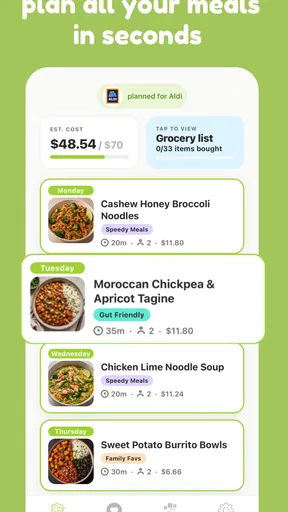
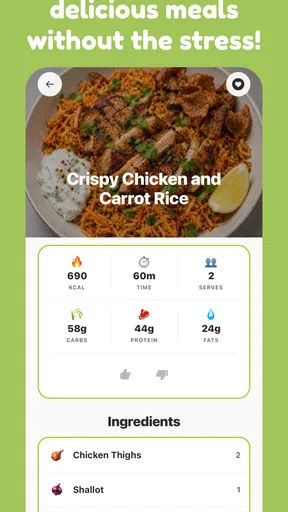
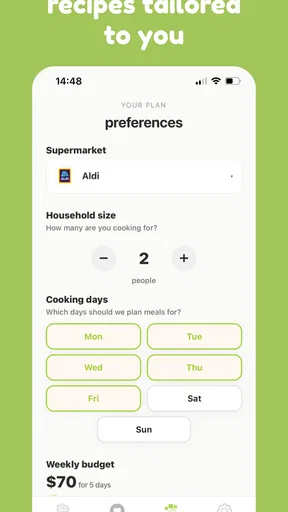
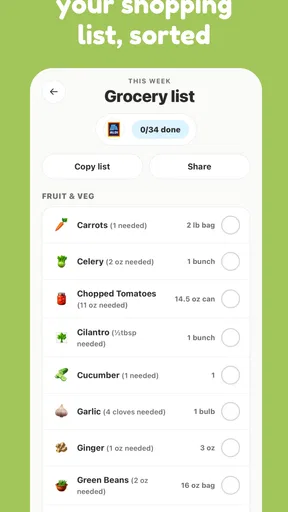
Our Review of mise - meal planner
 Analysis by Appyee
I like meal-planning apps most when they reduce the number of decisions I have to make after a long day. That is the role mise aims to fill: it is a free Food & Drink app from Tegs Labs Ltd that focuses on giving me meal ideas instead of leaving me to search through scattered recipes, saved posts, and half-formed plans.
After spending time with it, my impression is that its value depends less on making cooking complicated and more on making the first choice easier. That sounds modest, but it matters. A useful meal planner can help me avoid the familiar cycle of opening the refrigerator, finding nothing inspiring, and ordering something simply because deciding feels like work.
The app has a 4.6 average from around 994 ratings, with more than 10K installs. Those figures suggest that mise has already found an audience, although I would still treat it as a focused planning tool rather than a complete replacement for every cooking app. Its current version is 1.0.61, and the app is rated for Everyone, which makes it approachable for households with different levels of cooking experience.
How mise feels during everyday planning
When I use mise for everyday planning, I find it helps to begin with the shape of the week rather than trying to solve every dinner at once. I would first mark the evenings likely to be busy, then look for ideas that suit the time and energy I expect to have. That small habit makes the next step—turning appealing choices into a workable plan—much easier.
Quick ideas are more useful than an overloaded recipe library
The strongest part of the concept is the way it puts meal ideas at the center. Traditional recipe apps often make me work through filters, ingredients, cuisines, dietary labels, preparation times, and endless search results before I reach a decision. A meal planner has a different job: it should help me move from “What should I eat?” to “This will do” with as little mental effort as possible.
That distinction makes mise appealing when I am planning several meals at once. I can approach it with a rough goal, such as finding ideas for a busy week, rather than needing to know the exact dish I want before opening the app. The experience is better suited to inspiration and routine than to hunting for one very specific recipe.
I would not describe it as a magic solution for indecision. Meal suggestions still need to fit my appetite, available ingredients, budget, and time. The app can narrow the field, but I remain responsible for deciding whether an idea is realistic on a particular evening. That is a healthy limitation: planning support is not the same thing as automatic household management.
What I would do before relying on a plan
My practical advice is to use mise when I have a short planning window, not only when I am already hungry. Looking at ideas before shopping gives me a chance to notice repeated ingredients and build a more sensible basket. If I wait until dinner time, even a good suggestion may feel inconvenient because I have not prepared for it.
A useful workflow is to review the coming meals, choose the ideas that genuinely fit the week, and then check each one against what is already in the kitchen. This prevents a common meal-planning mistake: selecting attractive dishes that require a completely different set of ingredients every night. The app can provide variety, but I still need to create the practical connection between those ideas and my actual cupboard.
Another small but important habit is to keep a fallback meal in mind. A plan can be disrupted by late work, missing ingredients, or simply not feeling like cooking. mise works best as a source of direction rather than a strict contract. I find that flexible planning is more sustainable than assigning a perfect meal to every evening and feeling that the whole system has failed when one night changes.
Speed when I am making a decision
In normal use, the important question is not whether an app opens dramatically quickly; it is whether it lets me reach a useful idea without unnecessary friction. mise is built around a narrow purpose, so it feels easier to approach than a broad food platform that combines recipes, videos, social content, shopping, and restaurant discovery in one place.
That focused design should help during short planning sessions. I can open it with a specific task in mind, scan the available direction, and decide whether an idea belongs in my week. The benefit is especially noticeable when I am trying to plan lunch for work or dinner after a busy day, because I do not want to spend the same amount of time choosing food as I would spend preparing it.
Still, speed is also affected by the quality of the suggestions for my situation. If an idea does not match what I eat or what I have time to cook, I have to spend additional effort adapting it. This is why I see mise as a fast starting point, not an instant answer to every dietary or logistical problem.
When the app faces heavier use
The more demanding moment is not necessarily one long session. It is the repeated use that comes with planning a full week, revisiting ideas, comparing possibilities, and adjusting the plan when circumstances change. That is where I would judge whether mise remains comfortable over time rather than merely pleasant during a first opening.
For a person who plans one meal at a time, the app should be easy to understand. Someone managing several people, different preferences, leftovers, and a tight shopping routine will naturally place more demands on it. The app’s central promise is still useful in that situation, but I would avoid expecting it to replace a separate note-taking or grocery workflow unless it fits the way that household already organizes food.
There is also a trade-off between variety and efficiency. Browsing many ideas can be enjoyable, but too much choice can recreate the decision fatigue the app is meant to reduce. I get the best results when I set a limit before browsing: for example, choosing only a few realistic candidates for the next few days. That turns inspiration into a manageable plan instead of another endless feed.
Stability and recovering from interruptions
A meal planner earns trust through consistency. I want to be able to return to it after a distraction, remember what I was considering, and continue without having to rebuild the entire thought process. In practical use, that means I would keep my planning sessions simple and confirm my choices as I go rather than treating the app as the only place where my weekly plan exists.
This is also where I recommend a little caution with any digital planning tool. A phone call, a low battery, or a change of schedule can interrupt a session. For an important shopping trip, I would keep the final meal choices somewhere I can quickly reference while in a store. That is not a criticism unique to mise; it is a sensible backup for any app-based routine.
The app’s focused purpose helps its reliability from a user perspective because I am not asking it to do unrelated tasks. I open it to think about meals, and that clear expectation makes it easier to notice whether it is helping. If I need detailed cooking instruction, nutritional analysis, or a sophisticated pantry system, I would pair it with another tool instead of forcing mise to cover every part of the process.
Device requirements and everyday accessibility
mise supports devices running Android 8.0 or later, so its audience includes many phones that are not recent flagship models. That is useful for families sharing older devices or for anyone who keeps a dependable phone for everyday tasks rather than upgrading frequently.
The app is free to download, with in-app purchases ranging from $10.99 to $39.99 per item. I would therefore approach the free experience first and decide whether any paid option genuinely improves my planning routine before spending money. The presence of purchases does not automatically make the app poor value, but it does mean that “free” should be understood as an entry point rather than a guarantee that every possible part of the experience costs nothing.
Because meal planning is something I may do while standing in the kitchen, at a work desk, or in a supermarket, a comfortable device experience matters. A phone is convenient for quick decisions, but a larger screen can be easier when I am comparing several ideas or coordinating a household plan. I would use the phone for choosing and reviewing, then keep the final plan concise enough to consult without repeatedly navigating through the app.
Resource demands are also worth considering in realistic terms. This is not an app I would expect to keep open continuously. Its natural pattern is short visits: open it, make a decision, leave it, and return later. That makes it a good match for ordinary mobile use, where conserving attention and battery matters more than maintaining a long-running session.
Who will get the most from it
I would recommend mise to someone who enjoys cooking but dislikes deciding what to cook. It is also a sensible fit for a person trying to establish a regular meal routine without beginning with an elaborate spreadsheet. Students, busy professionals, and small households may appreciate the lighter approach because the app starts with ideas rather than demanding a detailed planning system.
It can also help a confident cook who has fallen into repetition. When I already know how to prepare food, the problem is often not technique but imagination. A meal planner can act as a prompt to rotate familiar ingredients into different meals, provided I am willing to adapt an idea to what I actually have.
Families may find it useful as a conversation starter, especially when one person normally carries the entire mental load of deciding dinner. Instead of asking an open-ended “What do you want?”, I can bring a small selection of possible meals to the discussion. That does not solve differing tastes, but it makes the conversation more concrete.
Who should choose another kind of app
I would look elsewhere if my main requirement were advanced nutrition tracking, precise calorie targets, allergy management, or a detailed inventory of every ingredient at home. Those needs call for specialized tools with more structured controls. mise is better understood as a planning companion than as a medical, nutritional, or stock-management system.
I would also hesitate if I wanted a large community of cooks, extensive video instruction, or restaurant-style discovery. A general recipe platform may be better for learning a technique step by step, while a grocery-focused service may be more suitable for turning a plan directly into a highly organized shopping process.
People who dislike suggestions and prefer to choose every dish themselves may not gain much from it. The app’s value comes from reducing the blank-page problem. If I already have a firm weekly menu and enjoy maintaining it manually, adding another planning layer could create more work rather than less.
How it compares with familiar alternatives
Compared with searching the web, mise offers a more deliberate starting point. Web searches are powerful when I know exactly what I want, but they often return too many options and require me to judge which pages are practical. mise makes more sense when my question is broader: “What could I make this week?”
Compared with a notes app, the advantage is direction. A notes app is excellent for storing my own recipes, writing substitutions, or recording family preferences, but it cannot necessarily inspire me when I have no idea what to write down. I see mise and notes as complementary: one helps generate a plan, and the other can preserve the personal details that make the plan workable.
Compared with a full grocery-planning platform, mise appears more approachable for the first step of the process. Grocery tools are valuable when quantities, lists, and purchasing are the main concern. I would choose mise when the bigger obstacle is selecting meals in the first place, then use whatever shopping method is most reliable for my household.
My performance verdict
mise succeeds because it keeps its purpose understandable: helping me move toward delicious meal ideas without making planning feel like an administrative project. Its focused nature supports quick visits, lighter decision-making, and a routine that can fit around ordinary life. The Android 8.0 minimum also makes it accessible to people using older compatible phones.
My main reservation is that the app cannot remove the practical work that comes after inspiration. I still need to consider ingredients, time, preferences, and changes to my schedule. The in-app purchase range also means I would test the free starting point carefully before deciding whether the paid choices are worthwhile for my habits.
Overall, I would recommend it to a friend who repeatedly asks what to cook and then gives up because the options feel overwhelming. I would not present it as a complete kitchen-management system, but as a focused way to get unstuck. The best reason to try mise is simple: it turns meal planning from an empty question into a concrete next decision.
Developed by Tegs Labs Ltd and rated for Everyone, it is approachable enough for casual use while still offering a practical routine for people who want more structure. If I wanted advanced nutrition tools or a deeply integrated shopping workflow, I would choose a more specialized alternative. For everyday inspiration and a gentler path toward planning meals, however, mise is a useful addition to my phone.
Verdict
Strengths of mise - meal planner
- Creates organized weekly meal plans in just a few taps.
- Helps reduce food waste by planning ingredients in advance.
- Offers recipe ideas suited to different meal preferences.
- Makes grocery shopping easier with a structured ingredient list.
- Useful for maintaining a consistent cooking routine at home.
Limitations of mise - meal planner
- Some recipes or planning features may require a paid subscription.
- The recipe selection may feel limited for highly specific diets.
- Ingredient availability can vary depending on your location.
- Plans may need manual adjustments for family-size portions.
- Requires regular input to keep preferences and schedules accurate.
Similar Picks in This Category
View All
Rappi: Food Delivery, Grocery
Rappi, Inc - Delivery3.5

McDonald’s: Cupons e Delivery
Arcos Dorados4.3

Swiggy: Food Instamart Dineout
Swiggy4.7

Blinkit: Groceries & more
Blinkit4.8

foodpanda: food & groceries
Foodpanda GmbH a subsidiary of Delivery Hero SE4.0

Zomato: Food Delivery & Dining
Zomato4.7
Frequently Asked Questions
What is mise - meal planner, and who is it designed for?
mise - meal planner is a meal-planning app designed to help you organize recipes, plan meals, and prepare shopping lists in one place. It can be useful for busy individuals, couples, families, and anyone trying to cook more consistently. The app is especially helpful if you want a clearer weekly routine instead of deciding what to eat at the last minute.
Can I use mise - meal planner to create a weekly meal plan?
Yes, the app is built around organizing meals in advance, so you can arrange recipes and dishes across different days of the week. This makes it easier to see what you intend to cook and identify missing ingredients before shopping. Its usefulness depends on how much time you invest in adding recipes and maintaining your plan, but the layout is intended to simplify weekly meal organization.
Does mise - meal planner automatically create a grocery or shopping list?
mise - meal planner can help turn your planned recipes into a more practical shopping list, reducing the need to write ingredients down manually. Depending on the recipe information and quantities you enter, ingredients can be grouped or combined for easier shopping. You should still review the list before visiting a store, particularly when recipes use optional ingredients or different serving sizes.
Can I add my own recipes and adjust serving sizes in mise - meal planner?
The app is most useful when it reflects the way you actually cook, so adding personal recipes and adapting meal details is an important part of the experience. You can generally organize your own dishes rather than relying only on preset ideas, and serving adjustments may help calculate more suitable ingredient amounts. Always check quantities manually when scaling complex recipes.
Is mise - meal planner free to download, and does it require an account?
The availability of free features, premium options, and account requirements may vary between the Android and iOS versions and can change with updates. Before downloading, check the current store listing for subscription details, in-app purchases, privacy information, and supported devices. If synchronization or backup is offered, an account may be required to keep your meal plans available across devices.
